


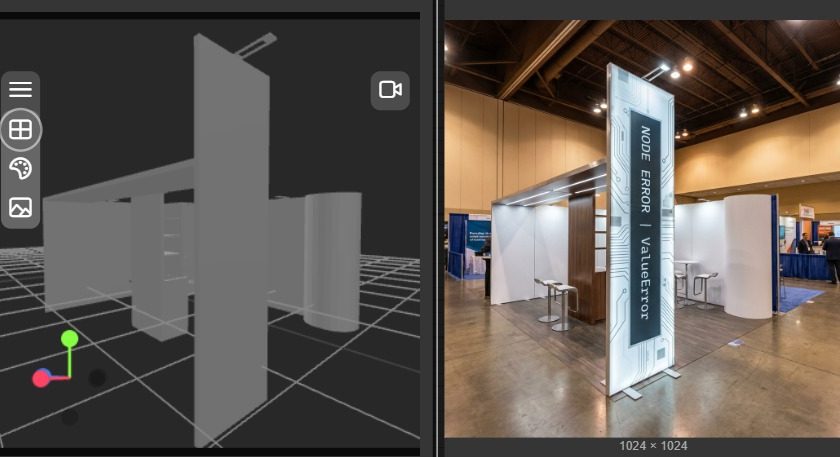
3D CAD Import & Export for AI Exhibition Booth Design
If you’ve ever tried to move from a CAD model to pitch-ready visuals (or back again), you’ll know the pain: duplicated work, file conversions, and “can you rebuild this in another tool?” requests that burn days.
That’s why we’re excited to share a major capability upgrade: ExpoBooth.ai now supports 3D CAD model import and export.
In plain terms: you can bring existing 3D booth models into ExpoBooth.ai, generate high-quality conceptual renders and visualisations faster, then export the 3D model again for downstream workflows.
This is a big deal for agencies, stand builders, and in-house expo teams because it removes one of the most common bottlenecks in exhibition design: the handoff gap between concept visuals and build reality.
The old way: beautiful visuals, slow rebuilds
Traditionally, teams end up in one of these situations:
- You have CAD, but it’s not presentation-ready, so visuals take ages.
- You have visuals, but they’re not connected to a model, so builders need to recreate everything.
- You iterate the concept, but the model falls behind (or the visuals do).
That’s where timelines stretch from “a quick concept” into a week to 10 days (sometimes longer), depending on studio capacity and how many times the files bounce between teams.
The new way: CAD → concept visuals → CAD (without the friction)
With CAD import/export, you can now:
- Start from an existing CAD model (instead of re-modelling from scratch)
- Generate photoreal conceptual renders and cinematic visualisations quickly
- Iterate design directions without losing the underlying 3D structure
- Export the updated model for builder workflows and further detailing
This makes early-stage design faster and makes the transition to build smoother.
What this unlocks (practically)
Here are the real-world wins we’re seeing.
1) Faster concept upgrades for existing booth systems
Many brands and builders already have modular systems or previous-year booths in CAD.
Now you can:
- import the existing model
- refresh the look and feel (materials, lighting, graphic intent)
- generate multiple visual directions for approval
…without restarting the entire project.
2) Quicker “what if?” iterations during pitches
Pitch teams need speed, but they also need credibility.
CAD import means you can explore variations like:
- open vs semi-enclosed meeting zones
- different canopy/hero structures
- adjusted sightlines and entry points
- alternative product demo placements
…and show them as decision-ready visuals fast.
3) Fewer misalignments between concept and build
When visuals are disconnected from a model, details drift:
- proportions change
- heights get misread
- features get value-engineered unexpectedly
Working from the model reduces ambiguity and helps everyone align earlier.
4) Cleaner handoffs between creative and technical teams
A common failure point is the handoff:
- creative team signs off a look
- builder receives partial info
- builder rebuilds, then compromises appear
Exportable models make the handoff more concrete, so the approved direction is more likely to survive the journey to fabrication.
Who this is for
This feature is especially valuable if you’re any of the following:
- Stand builders who want faster, better-looking pitch visuals without duplicating modelling work
- Event agencies who need to iterate concepts quickly and keep feasibility grounded
- Exhibitors with existing booths who want to modernise and re-skin without a full redesign
How to use it (simple workflow)
A practical workflow looks like this:
- Import your 3D CAD model into ExpoBooth.ai
- Add your brief inputs (brand guidelines, moodboard, messaging priorities)
- Generate multi-angle renders and cinematic walkthrough-style visuals
- Iterate variations quickly (layout, features, look/feel)
- Export the 3D model for downstream detailing, engineering, or builder delivery
Why this makes conceptual renders quicker & easier than ever
Concept visuals are only “fast” when you’re not rebuilding the same geometry repeatedly.
By starting from what already exists (CAD) and keeping the workflow connected end-to-end, you reduce:
- rework
- translation errors
- back-and-forth between tools
- delays caused by creative bandwidth
The result: quicker approvals, smoother production, and less friction across teams.
Where ExpoBooth.ai fits (and why it’s different)
ExpoBooth.ai is purpose-built for exhibition design workflows, combining:
- AI-powered concept generation and visualisation
- exhibition-specific logic (not generic AI imagery)
- human oversight to keep outputs on-brand and pitch-ready
- now: 3D CAD import/export to connect concept and build